
Reports
Attendance reports you can filter and export to CSV.
Meadow turns the attendance your team records each day into reports you can read, filter and share. They're handy for your own records, for billing, and for showing accurate numbers at inspection.
Open Reports from the menu on the left. It's a staff-only area — parents and family never see it. Right now there are two attendance reports you can use, plus the NCS report.
The reports you can use
- Check-in — a detailed list of every check-in and check-out, who signed in and out, and total hours.
- Child attendance — a weekly grid that shows each child's expected attendance against what actually happened. This is also where you correct a day.
- NCS — your National Childcare Scheme returns. This one lives under NCS funding.
Note: Two more reports — Daily attendance and Hours present — are on the way but aren't ready yet. You'll see "This report is coming soon." if you reach them. For now, Check-in and Child attendance cover the same ground.
Check-in report
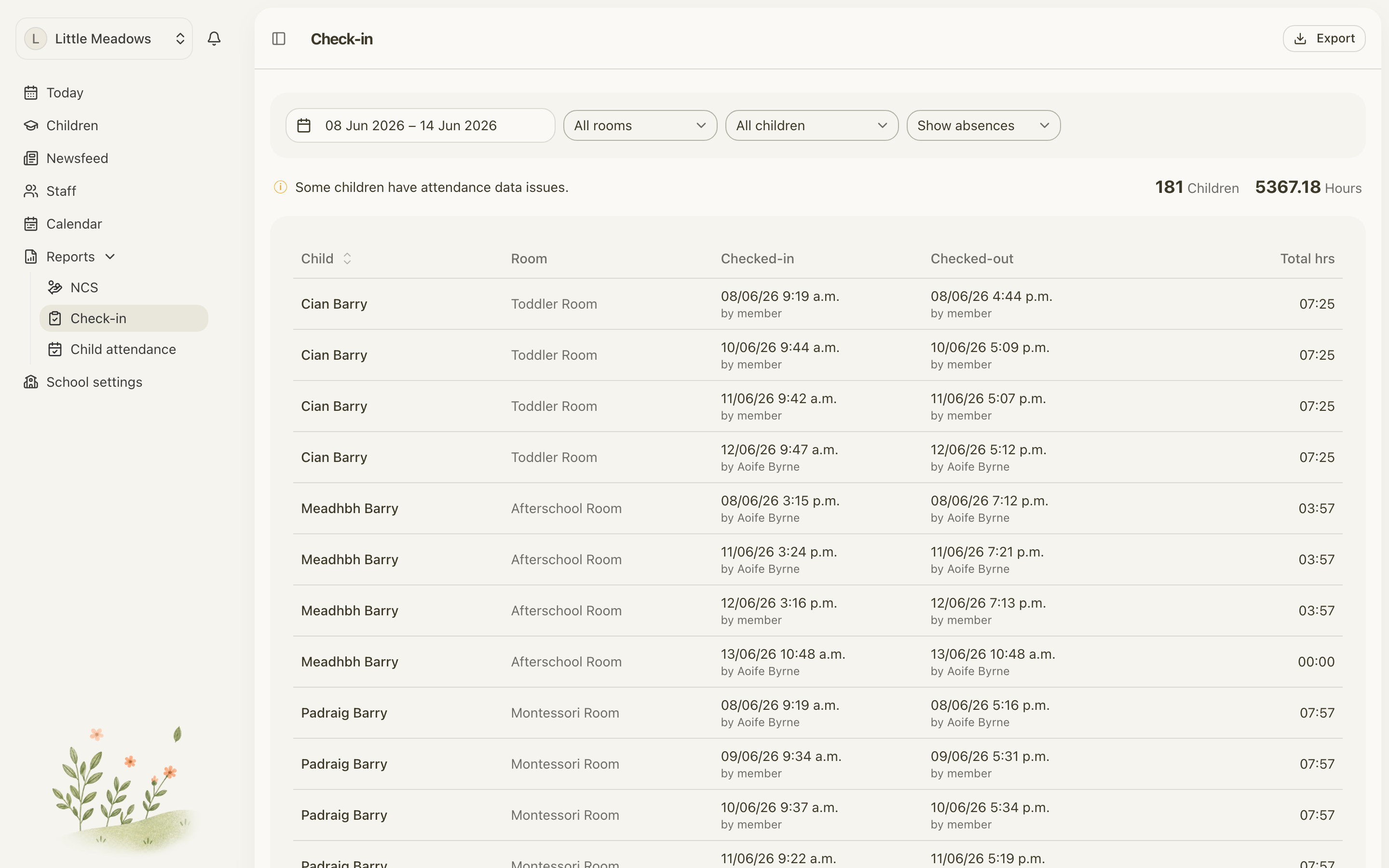
The Check-in report is your detailed attendance log. Each row is one child for one day, with their check-in and check-out times and the total hours they were present.
Filter the report
At the top of the page you can narrow what you're looking at:
- Date range — defaults to this week (Monday to Sunday). Change it to look at any other span.
- Room — defaults to All rooms. Pick one room to focus on it.
- Child — defaults to All children. Pick one child to follow them across the range.
- Show absences / Hide absences — absences are shown by default. Hide them if you only want children who were in.
Above the table you'll see a quick summary: the number of Children and the total Hours for the range you've chosen.
Read the table
The table has these columns:
- Child — the child's name.
- Room — the room they were in.
- Checked-in — the time they arrived, and who signed them in.
- Checked-out — the time they left and who signed them out, or a red Missing badge.
- Total hrs — how long they were present.
A red Missing badge means that child was signed in but never signed out, so Meadow can't work out their hours. A warning also appears above the table when this happens. Put it right in the Child attendance report — see Correcting attendance.
Absent rows show the reason for the absence in place of the times.
Export it
Select Export to download the report as a CSV file. Open it in your spreadsheet (Excel, Numbers or Google Sheets) to sort, total or print it. Irish fadas come through correctly.
Child attendance report
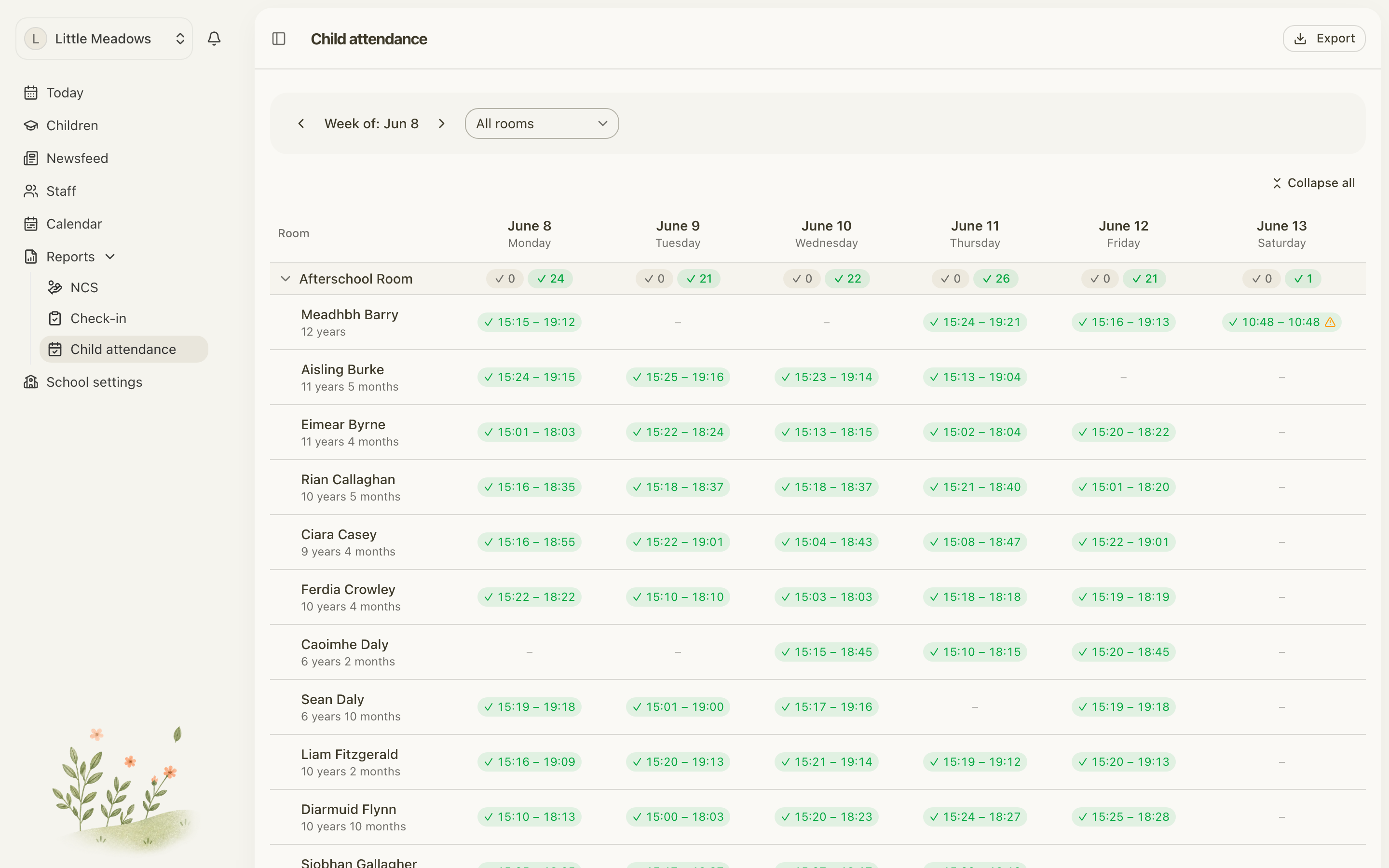
The Child attendance report is a weekly grid. Down the side you have your children; across the top you have the days of the week. Each cell shows what was expected against what actually happened, with sign-in and sign-out times.
- Use the week navigator — Week of: {date} with previous and next arrows — to move between weeks.
- Use the Room filter to focus on one room.
- Select Export to download the week as a CSV file.
This report is also where you fix attendance. Click a day cell to edit, void or add a check-in or absence for that child. The full walkthrough is in Correcting attendance.
Common questions
Where are the Daily attendance and Hours present reports? They're coming soon and aren't available yet. The live attendance reports are Check-in and Child attendance, plus the NCS report.
Can I export to PDF? Exports are CSV only. Open the file in your spreadsheet, then print or save to PDF from there if you need a PDF copy.
What does the red Missing badge mean? A child was checked in but never checked out, so their hours can't be totted up. Fix it in the Child attendance report by clicking that day's cell — see Correcting attendance.
Can parents see Reports? No. The whole Reports area is staff-only. Parents and family only ever see the children they're linked to.
My report is empty. Check your filters. The date range defaults to this week, so widen it if you're after an older span, and make sure your Room and Child filters aren't hiding the rows you want. If there's genuinely nothing to show, you'll see "No results found".