
Recording absences
Log when a child is going to be out, so your day's numbers stay accurate.
When you know a child is going to be out — off sick, away on holiday, or just not in — recording it keeps your attendance accurate and gives you a clear picture of who's expected each day.
There are two ways to do it from the child's profile: the quick Mark as buttons, or the full Mark Absent dialog.
The fastest way: Mark as
Open the child's profile and go to the Activity tab. In the Quick actions card you'll see a Mark as section with three buttons.
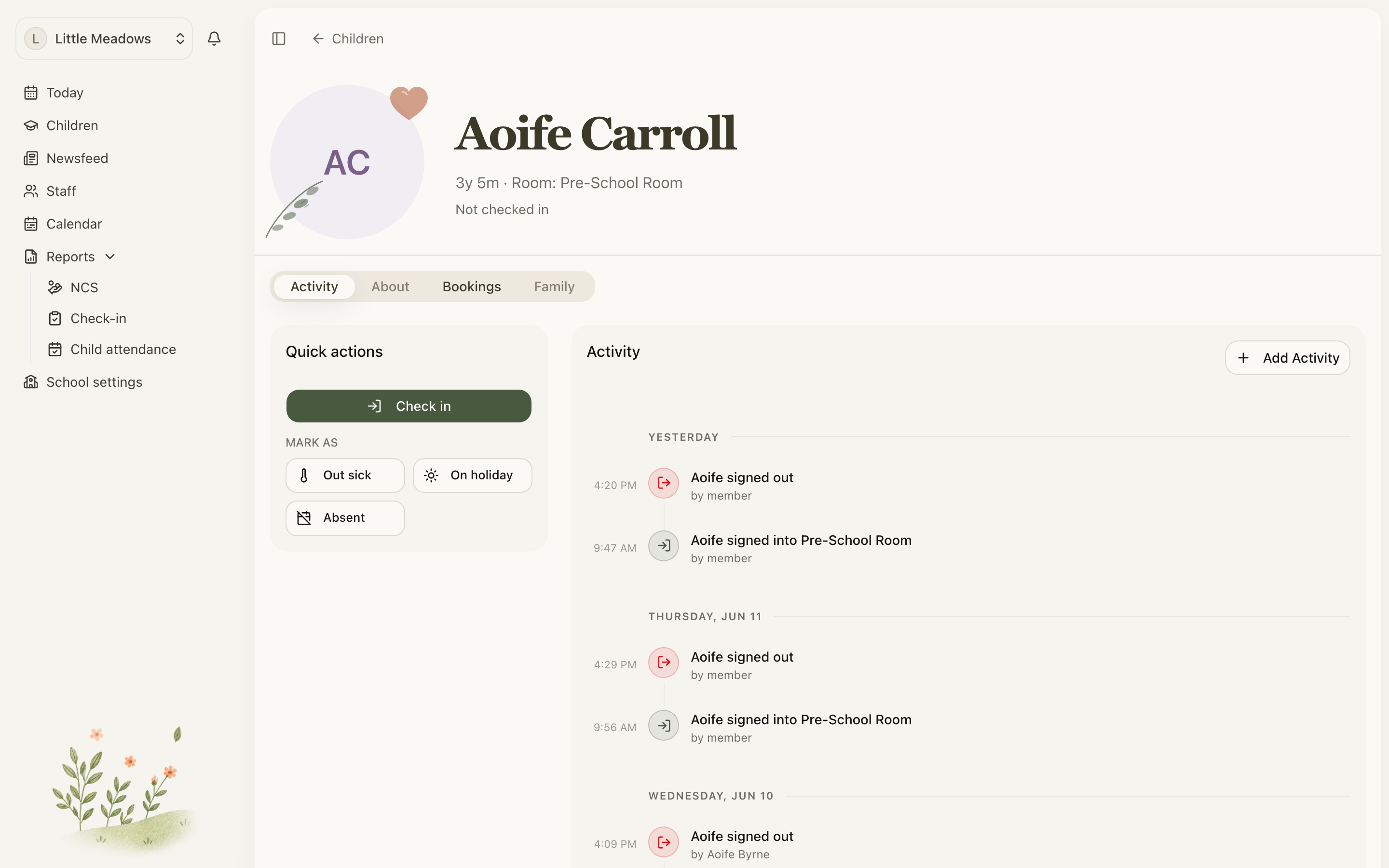
- Click Out sick, On holiday, or Absent.
- The Mark Absent dialog opens with that reason already chosen and the dates set to today.
- Adjust the dates if you need to, then click Mark Absent.
You'll see a Marked as absent confirmation, and the child's status updates straight away.
Tip: Use Mark as when the absence is just for today — it's a couple of clicks. Open the full dialog when the child will be out for several days.
The full way: the Mark Absent dialog
If you need to set a date range or add a note, open the Mark Absent dialog from the Quick actions card.
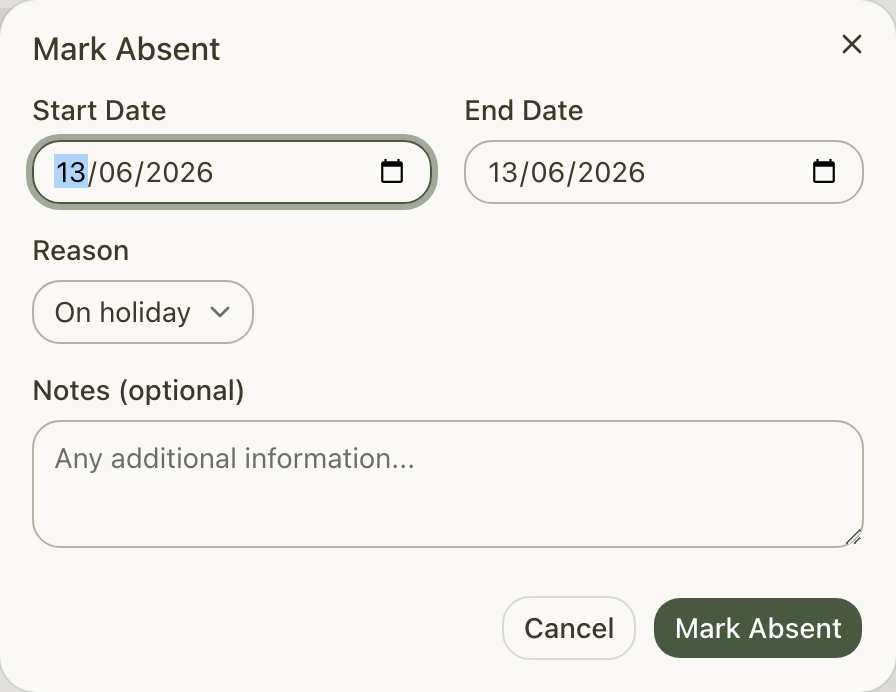
- Set the Start Date and End Date. Both default to today.
- Choose a Reason — Out sick, On holiday, or Absent.
- Add any Notes (optional) — up to 500 characters.
- Click Mark Absent.
The absence covers whole days, from the start date through to the end date. If it covers today and the child is currently checked in, Meadow checks them out automatically so the day's figures stay correct.
What the three reasons mean
These are the only three reasons available for a child's absence:
- Out sick — the child is unwell.
- On holiday — a planned break away.
- Absent — a general or unexplained absence.
Editing or removing an absence
Plans change, so you can edit or remove an absence at any time. How you do it depends on where you are.
- From the Quick actions card — if the child is currently marked absent, click Cancel to remove it. This happens immediately, with no extra confirmation.
- From the profile timeline — open the absence's menu and choose Edit to change the dates, reason or notes, or choose Delete and confirm in the Remove this absence? dialog.
- From the Child attendance report — open a day cell and click Remove. For a multi-day absence, Meadow confirms that removing it clears every day in the range.
A few rules that keep things tidy
- Absences can't overlap for the same child. If one already covers some of your dates, edit that one rather than adding a second.
- You can't mark an absence on a day that already has attendance recorded. Clear or fix that day's check-in first (see Correcting attendance).
- The End Date must be on or after the Start Date.
- Parents can record absences for their own children, so a family can let you know in advance without ringing round.
Common questions
Why won't it let me mark a child absent — it says they already have attendance recorded?
You can only mark an absence on a day with no attendance activity. The exact message is: "This child already has attendance recorded for the selected dates. You can only mark absences for dates with no attendance activity." Remove or correct that day's check-in or check-out first — see Correcting attendance — then record the absence.
I got "An absence already exists that overlaps with the selected dates." What now?
A child can't have two overlapping absences. Edit the existing absence to cover the full range instead of creating a second one: open the child's profile timeline, open the absence's menu and choose Edit. You can also remove the existing one first.
Can I undo an absence I added by mistake?
Yes. If the child is still marked absent, click Cancel in the Quick actions card to remove it instantly. Otherwise open the absence on the profile timeline and choose Delete, or remove it from the Child attendance report.
What about staff absences?
Staff absences are a separate feature with their own, wider set of reasons — they aren't limited to the three above.