
Correcting attendance
Fix a wrong time, add a missed sign-out, or backfill a past day — with a full audit trail.
Things happen. Someone forgets to sign a child out, a time gets stamped at the wrong moment, or a day goes by with nobody at the screen. Meadow lets staff put it right after the fact — and it keeps the original on record, so your attendance stays honest and inspection-ready.
Check-in and check-out always stamp the current time, so this is where you go to change a time or fill in a day that was missed. If you just need the day-to-day basics, see Checking children in and out.
Note: Correcting attendance is staff only. Owners, managers, senior practitioners and practitioners can make corrections; parents and family cannot, even though they can sign their own children in and out.
Open the day you want to fix
You correct attendance from the Child attendance report.
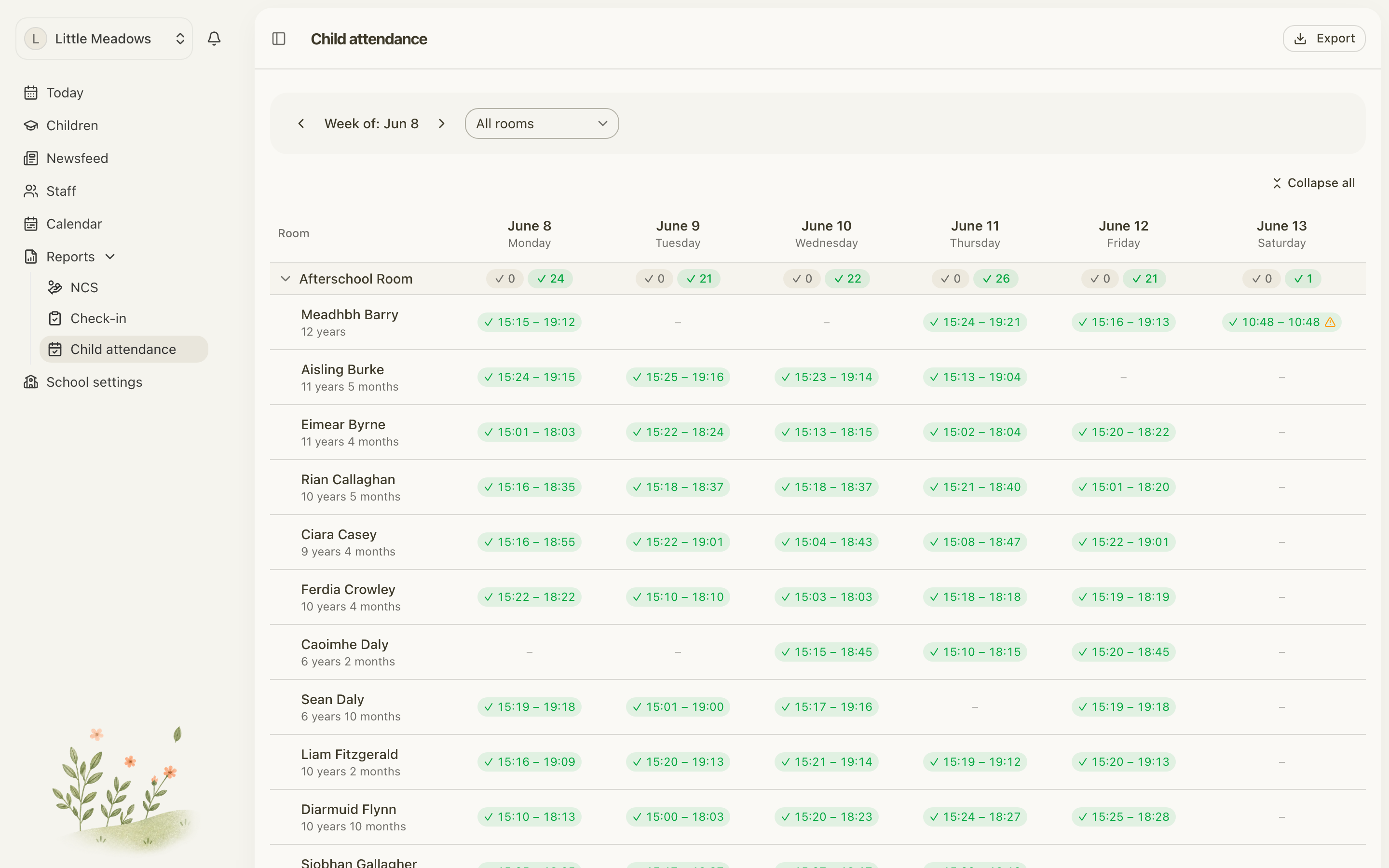
- Go to Reports and open Child attendance.
- Find the child and the week you need.
- Click the child's day cell for that day.
This opens Attendance on {date}, where everything for that one day lives — the recorded session, any absence, and the buttons to change them.
Fix a time
Use this when a sign-in or sign-out time is wrong, or when a child was never signed out.
- In Attendance on {date}, click the pencil to edit the session.
- Adjust the Sign-in time or Sign-out time.
- To add a missing sign-out, type a Sign-out time that's after the sign-in.
- Save. You'll see Attendance updated.
Note: You can't simply clear a sign-out time — Save stays disabled and you'll see "To remove a sign-out, remove the whole record instead." If a child shouldn't have a sign-out at all, remove the session and re-record it.
Remove a session
Use this when a session shouldn't be there — a duplicate, a wrong child, or a check-in that was never meant to happen.
- In Attendance on {date}, click the trash icon next to the session.
- A confirm appears: "Remove this attendance record? It stays in the audit trail."
- Enter a Reason (this is required).
- Click Remove. You'll see Attendance removed.
The session disappears from the day, but nothing is truly deleted — the original stays in the audit trail, along with your reason. Removing a session also clears its paired sign-out and any room moves that day.
Backfill a day with no session
If a day went by with no attendance recorded at all, you can add it after the fact.
- Open the empty day cell to bring up Attendance on {date}.
- At the bottom, click Sign in.
- Choose the Room, set the Sign-in time, and add a Sign-out time if you have one.
- Confirm. You'll see Attendance recorded.
Mark leave instead
If the child was off that day rather than present, mark it as leave instead of recording a session. At the bottom of Attendance on {date} you'll find Holiday, Sick day and Absence.
These are only available when there's no session recorded for that day. If a session exists, the buttons are disabled and show "Remove the attendance record first" — remove the session, then mark the leave.
What you can't do
A couple of guardrails keep your records clean:
- No future times. You can't set a sign-in or sign-out in the future. Meadow will stop you with "Attendance times cannot be in the future."
- One session per day for editing. If more than one check-in and check-out was recorded on the same day, Meadow shows a combined span and won't let you edit it as a single record yet: "Multiple sessions were recorded this day. Editing the combined record isn't supported yet." For those days, remove the record and re-record it instead.
Common questions
I forgot to sign a child out yesterday — can I fix it? Yes. Open Reports → Child attendance, click that day's cell, edit the session and add the missing Sign-out time. If the whole day was missed, use Sign in to record it from scratch.
I checked a child out at the wrong time. How do I change it? Click the day cell, click the pencil, adjust the Sign-out time and Save. Times can only be changed here — check-out itself always stamps the current time.
Why won't it let me edit a day — it mentions multiple sessions? That day has more than one check-in/out session, so Meadow shows a combined span that can't be edited as one record yet. Remove the record and re-record it instead.
I cleared the sign-out time but Save is greyed out. There's no way to remove just a sign-out. Use Remove to take the whole session off, then re-record it if you need to.
If I remove a session, is it gone for good? No. Removing a session asks for a reason and keeps the original on record — "It stays in the audit trail." Nothing is ever hard-deleted.
For the full set of attendance views and exports, see Reports.